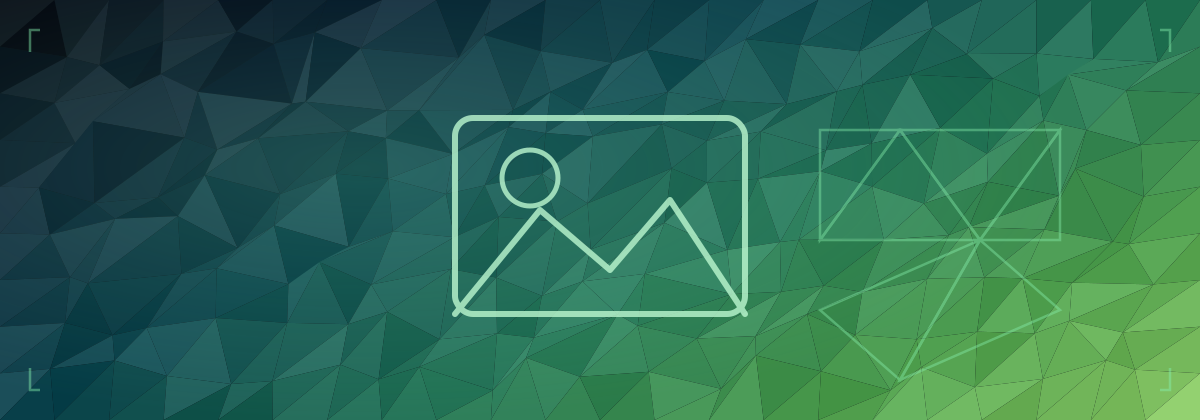
Low-Poly Hero Images in 150 Lines of JavaScript
Every blog post benefits from a header image. It gives the page visual weight, makes link previews look respectable, and breaks up what would otherwise be a wall of text. The problem: sourcing a unique, on-brand image for every post is tedious, and stock photos look generic.
The alternative: generate them in code.
Why SVG
The obvious format choices are JPEG and PNG. Both are fine for photographs, but for programmatically generated geometric art they're the wrong tool. SVG is:
- Vector — scales perfectly to any screen resolution without blurring
- Tiny — the generated images here are ~29 KB each, compared to hundreds of KB for an equivalent JPEG
- Already understood by browsers — no decoder, no additional request, no format negotiation
The one downside: SVG doesn't work as a JPEG fallback for very old browsers. For a tech blog, that's an acceptable trade-off.
The approach: low-poly triangulated mesh
A low-poly image is a triangulated mesh where each triangle is filled with a flat colour sampled from a gradient. The result looks geometric and intentional — futuristic without being garish.
The generation process:
- Divide the canvas into a grid of cells
- Place a vertex at each grid intersection, jittered by a random offset
- Split each cell into two triangles
- Colour each triangle by sampling a colour gradient at its centroid
- Add noise to the brightness per triangle so no two are identical
for (let r = 0; r < rows; r++) {
  for (let c = 0; c < cols; c++) {
    const tl = verts[r][c],   tr = verts[r][c + 1];
    const bl = verts[r+1][c], br = verts[r+1][c + 1];

    for (const [a, b, d] of [[tl, tr, bl], [tr, br, bl]]) {
      const cx = (a[0] + b[0] + d[0]) / 3;
      const cy = (a[1] + b[1] + d[1]) / 3;
      const t  = (cx / width * 0.6) + (cy / height * 0.4);
      const noise  = (rand() - 0.5) * 28;
      const colour = rgb(sampleGradient(palette, t).map(v => v + noise));
      polys.push(`<polygon points="..." fill="${colour}"/>`);
    }
  }
}
The diagonal gradient (cx * 0.6 + cy * 0.4) gives the image a sense of depth — lighter in one corner, darker in the other.
Seeded randomness
Every image uses a seeded linear congruential generator (LCG) instead of Math.random(). This means the same seed always produces the same image — deterministic output from the same inputs. Running the generator twice produces identical files.
function makeRng(seed) {
  let s = seed >>> 0;
  return function () {
    s = (Math.imul(s, 1664525) + 1013904223) >>> 0;
    return s / 0x100000000;
  };
}
This matters because the images are committed to the repo. If re-running the generator changed the output, the diff would show changes even when nothing meaningful had changed.
Per-post colour palettes
Each post gets a unique palette that reflects its content. The gradient is sampled across the palette as a multi-stop colour ramp.
hello-world — deep navy to indigo, evoking the glow of code on a dark screen:
palette: [
  [6,   6,  18],   // near black
  [10,  15,  50],  // dark navy
  [18,  28,  95],  // navy blue
  [38,  52, 155],  // medium blue
  [72,  82, 200],  // bright blue
  [108, 106, 240], // indigo
]
adding-comments — near black to orange ember, the colour of Cloudflare's brand and the fire-and-forget pattern used in the Worker:
palette: [
  [8,   8,  14],   // near black
  [35,  45,  80],  // dark slate
  [160, 90,  20],  // burnt orange
  [220, 130, 30],  // amber
]
Icon overlays
The low-poly background alone is recognisable but not immediately descriptive. Each image has an SVG icon layer on top — semi-transparent stroked shapes relating to the post's subject.
The icons use a glow filter to make them stand out against the triangulated background:
<filter id="iconGlow" x="-40%" y="-40%" width="180%" height="180%">
  <feGaussianBlur stdDeviation="10" result="blur"/>
  <feMerge>
    <feMergeNode in="blur"/>
    <feMergeNode in="blur"/>
    <feMergeNode in="SourceGraphic"/>
  </feMerge>
</filter>
Stacking two blur merge nodes doubles the glow intensity without increasing the blur radius, keeping the icon shape sharp while the halo bleeds outward.
The icons are positioned in the horizontal centre of the image (around x=600 on a 1200px canvas) so they remain visible in both the full hero view and the cropped homepage thumbnail, which shows roughly the central third of the image.
Integrating with the build
The build script checks for an image field in each post's frontmatter:
---
title: My Post
image: /images/my-post.svg
---
If present, it renders a hero image above the post header and wires up the og:image meta tag for social sharing:
const heroImage = data.image
  ? `<img class="post-hero" src="${data.image}" alt="${data.title}" loading="eager">`
  : '';
Posts without an image field render exactly as before — the feature is fully opt-in.
Keeping colours distinct
With a growing number of posts, palettes can start looking similar — particularly in the blue/teal range where it's easy to accidentally end up with two images that read as the same colour at thumbnail size.
The generator enforces uniqueness by comparing the glowColor of every image pair before generating anything. Each glow colour is converted to HSL and the circular hue distance is checked:
function hexToHsl(hex) {
  const r = parseInt(hex.slice(1, 3), 16) / 255;
  // ... convert to h, s, l
  return [Math.round(h * 360), Math.round(s * 100), Math.round(l * 100)];
}

function hueDiff(a, b) {
  const d = Math.abs(a - b);
  return Math.min(d, 360 - d); // accounts for the wrap from 359° → 0°
}
If any two glow colours are fewer than 12° apart in hue, the script exits with an error before writing any files:
⚠ Colour conflict: "home-assistant-pi-setup" (#f59e0b, H:38°) and
  "adding-comments" (#f97316, H:25°) — hue Δ13° (minimum 12°)
The cycling system
The hue wheel is 360°. With a minimum spacing of 30° between posts in the same cycle, you get 12 unique slots before the wheel repeats. Once all 12 are used, the next cycle starts with the hues shifted by ~15°:
- Cycle 1 (posts 1–12): 30° spacing — e.g. 25°, 84°, 142°, 172°…
- Cycle 2 (posts 13–24): same 30° spacing, offset +15° — e.g. 40°, 99°, 157°…
- Cycle 3+: shift another +15°
The minimum gap between any two colours across all cycles is therefore ~15°, well above the 12° conflict threshold. This keeps images visually distinct indefinitely without any manual colour management.
The generator script
Adding an image for a new post takes three steps:
- Add an entry to the
IMAGESarray inscripts/generate-images.jswith a unique seed, palette, andglowColor - Run
npm run generate-images— the conflict check runs automatically and will fail with a clear message if the chosen colour is too close to an existing one - Add
image: /images/post-name.svgto the post's frontmatter
The images live in public-static/images/ and are copied into public/images/ during the build. The dev server watches public-static/ for changes, so regenerated images appear immediately without restarting.
The result
Each post gets a unique 29 KB SVG image that loads instantly, scales to any resolution, and is generated entirely in Node.js with no external dependencies. The colour palette and icons make each image recognisable at a glance, even as a small thumbnail on the homepage.
The entire generator is about 150 lines of vanilla JavaScript.
Comments